Safe Voice Banking Guide Bangladesh 2026
For many people in Bangladesh—especially in rural areas or those who aren’t comfortable with complex smartphone apps—digital banking has always felt like a “typing test.” If you find it difficult to navigate menus or type in account numbers, 2026 has brought a revolutionary solution: Voice-Powered Banking.
Imagine being able to check your balance or send money just by talking to your phone in your own dialect. This is no longer science fiction. Platforms like Hishab and City Bank’s voice assistant are making “Voice diye taka pathano” (sending money via voice) a reality.
Here is your step-by-step guide to using these AI tools safely and effectively.
1. What is Voice-over-GSM Banking?
Voice banking in 2026 doesn’t always require a high-speed internet connection or a flagship smartphone.
- Hishab Voice Banking: This is a “Voice-over-GSM” platform. It allows users to dial a specific number and talk to an AI that understands natural Bangla.
- The Benefit: You don’t need to type, remember complex USSD codes (*247#), or even have a data plan. You simply talk, and the AI executes the command.
2. Step-by-Step: How to Use Voice Banking Safely
Step 1: Registration and Voice Biometrics
To start, you must register your voice with your bank (e.g., City Bank or a partner MFS).
- Call the bank’s official voice banking short-code.
- The AI will ask you to repeat a specific phrase several times.
- Why? This creates a “Voice Print” that is as unique as your fingerprint. Even if someone tries to mimic your voice, the AI banking security BD systems can detect the difference in frequency and tone.
Step 2: Authenticating a Command
When you want to perform a transaction, like “Voice diye taka pathano”:
- Say the command clearly: “Amar boun-ke 500 taka pathao” (Send 500 taka to my sister).
- The AI will repeat the details back to you to ensure accuracy.
Step 3: The Multi-Factor Confirmation
Even with voice recognition, security is multi-layered.
- After your voice command, the system will ask for a Voice PIN or send a traditional OTP (One-Time Password) to your registered mobile number.
- Confirm the transaction using this second layer of security.
3. Trust Signal: Is My Voice Data Secure?
In 2026, the collaboration between The City Bank and Intelsense AI has set a new standard for AI banking security in BD.
- Bank-Grade Encryption: Your voice commands are encrypted the moment they hit the network.
- Anti-Spoofing Technology: These systems are trained to recognize “Deepfake” voices or recorded playback, ensuring that a recording of your voice cannot be used to steal your money.
- Privacy: Under the 2026 Data Protection guidelines, your voice print is stored as a mathematical code, not an actual audio recording, so your privacy is maintained.
4. Safety Tips for Voice Banking
- Quiet Environments: Always perform voice transactions in a quiet place. Background noise can lead to the AI misinterpreting the amount or the recipient.
- Never Share Your Voice PIN: Just like a regular PIN, your voice-authenticated PIN should be private.
- Verify the Official Number: Only use voice banking via the official short-codes provided by your bank.
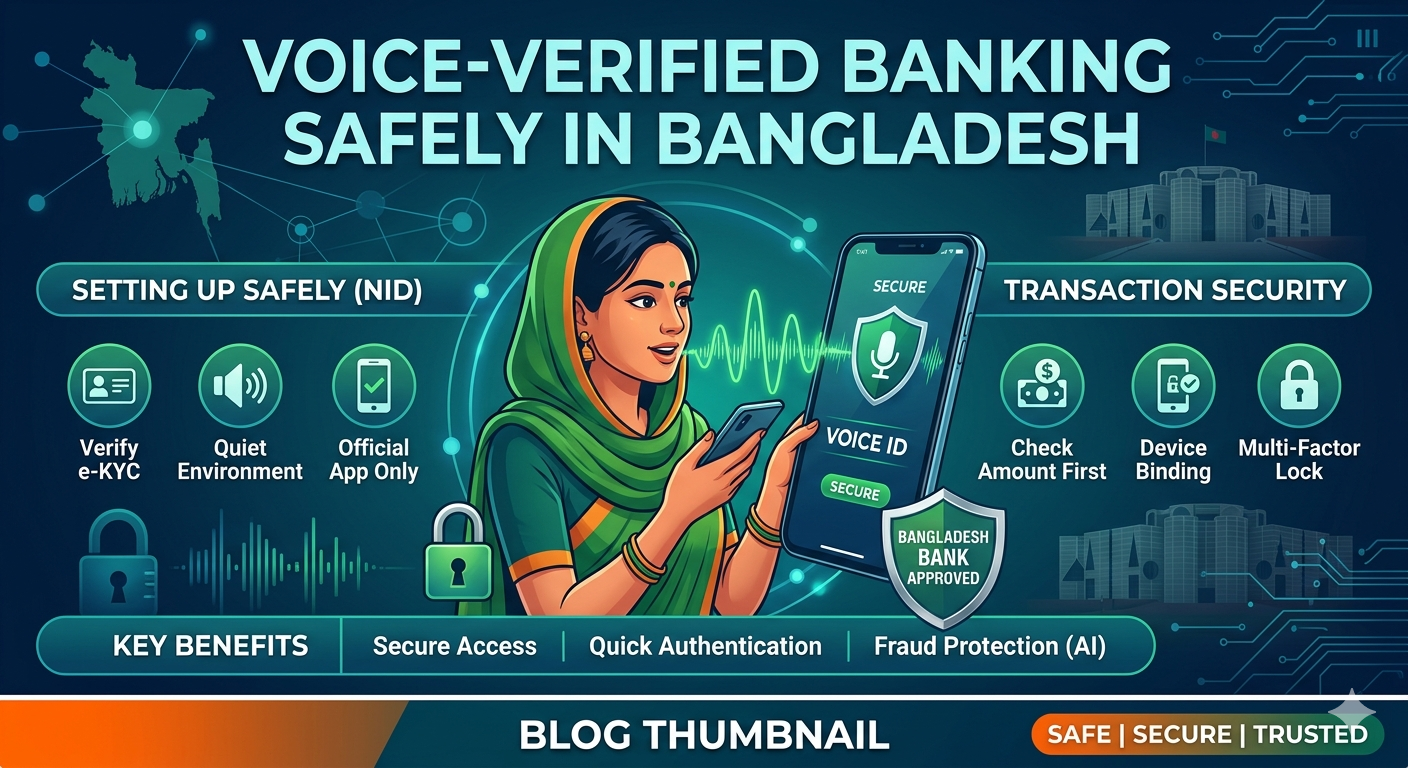
Another 5 Steps to Set Up Voice Verification Safely
- Enrol Through Official Apps Only: Use only authorized banking apps like Citytouch 2.0 or MTB Neo to set up your voice profile.
- Complete Multi-Stage Verification: Expect to complete several stages of identity checks, including e-KYC or NID verification, before voice features are fully enabled.
- Record in a Quiet Environment: To create a secure and accurate “voiceprint,” record your enrollment prompts in a place without background noise to prevent system errors.
- Use Natural Speech: Follow the app’s guidance to speak naturally; systems analyze your unique tone, rhythm, and frequency to confirm your identity.
- Pair with Device Binding: Ensure your bank’s app uses “Device Binding,” which restricts account access only to your specific, verified smartphone.
2. Essential Safety Requirements (2026)
To maintain high security, Bangladesh Bank now mandates specific standards for biometric banking.
| Requirement | 2026 Standard |
| Biometric PAD Solutions | Systems must detect “Presentation Attacks” (like deepfakes) and meet ISO 30107 standards. |
| Latest App Version | You must use the most recent version of your mobile banking app to ensure all security patches are active. |
| Updated Contact Info | Your registered mobile number and email must be current to receive critical security alerts. |
| Automatic Disconnect | Apps must automatically cease operation if they detect suspicious device behavior or vulnerabilities. |
3. Key Benefits for Users in Bangladesh
- Inclusive Banking: Voice commands make banking easier for users who may find navigating complex visual menus difficult.
- Faster Authentication: Replace traditional touch-tone IVR systems with conversational AI for quicker service during peak periods.
- Enhanced Fraud Detection: Advanced systems analyze multiple signals simultaneously to detect synthetic identities or injected audio in real-time.
- Hardware Independence: Unlike fingerprint scanners, voice verification works on any phone with a microphone, making it widely accessible.
4. Security Tips to Prevent Fraud
Report Suspicious Activity Immediately: Use your bank’s dedicated “Quick Response Cell” to report any unauthorized attempts to access your account.
Never Share Your OTP: Even with voice banking, banks will never ask for your One-Time Password (OTP) or PIN over a call.
Beware of Deepfake Scams: If you receive a call that sounds like a bank official but asks for sensitive info, hang up and call the official helpline (e.g., 16247 for bKash or 16167 for Nagad).
Enable Two-Factor Authentication (2FA): Always combine voice verification with another method, like a physical security key or app-based MFA, for high-value transactions.
5. Frequently Asked Questions (FAQ)
Q1: Does the AI understand different Bangla dialects?
Yes. In 2026, AI models like those used by Hishab are trained on thousands of hours of regional dialects (Chittagonian, Sylheti, etc.), making them highly accurate for all users in Bangladesh.
Q2: Can I use voice banking on a “Button Phone”?
Absolutely. One of the biggest advantages of Hishab voice banking is that it works over a standard phone call, meaning even the simplest feature phones are now “smart” banking devices.
Q3: What happens if I have a sore throat or my voice changes?
AI systems are designed to recognize core vocal patterns. However, if your voice changes significantly (e.g., due to illness), the system may fail to verify you. In such cases, you can fall back to traditional PIN-based or NID-based verification.
Q4: Is there a limit on how much I can send via voice?
To protect users, most banks set lower transaction limits for voice commands (e.g., 5,000 to 10,000 BDT) compared to app-based transfers.
Q5: Is it better than using a mobile app?
It isn’t necessarily “better,” but it is more accessible. For elderly users or those with visual impairments, voice banking is a life-changing convenience.
Final Thought: AI is no longer a barrier; it’s a bridge. By embracing voice-verified banking, you are moving into a future where your voice is your most secure credit card.
References
- Intelsense AI. (2026). The Future of Speech-to-Text in Bangladesh’s Financial Sector.
- The City Bank PLC. (2026). Digital Transformation: Our Journey with Voice Assistants.
- Hishab. (2026). Breaking the Literacy Barrier in Banking via Voice-over-GSM.
- Bangladesh Bank. (2026). Guidelines on AI-Driven Authentication in MFS.