Can I Send Money to bKash from the USA? (2026 Guide)
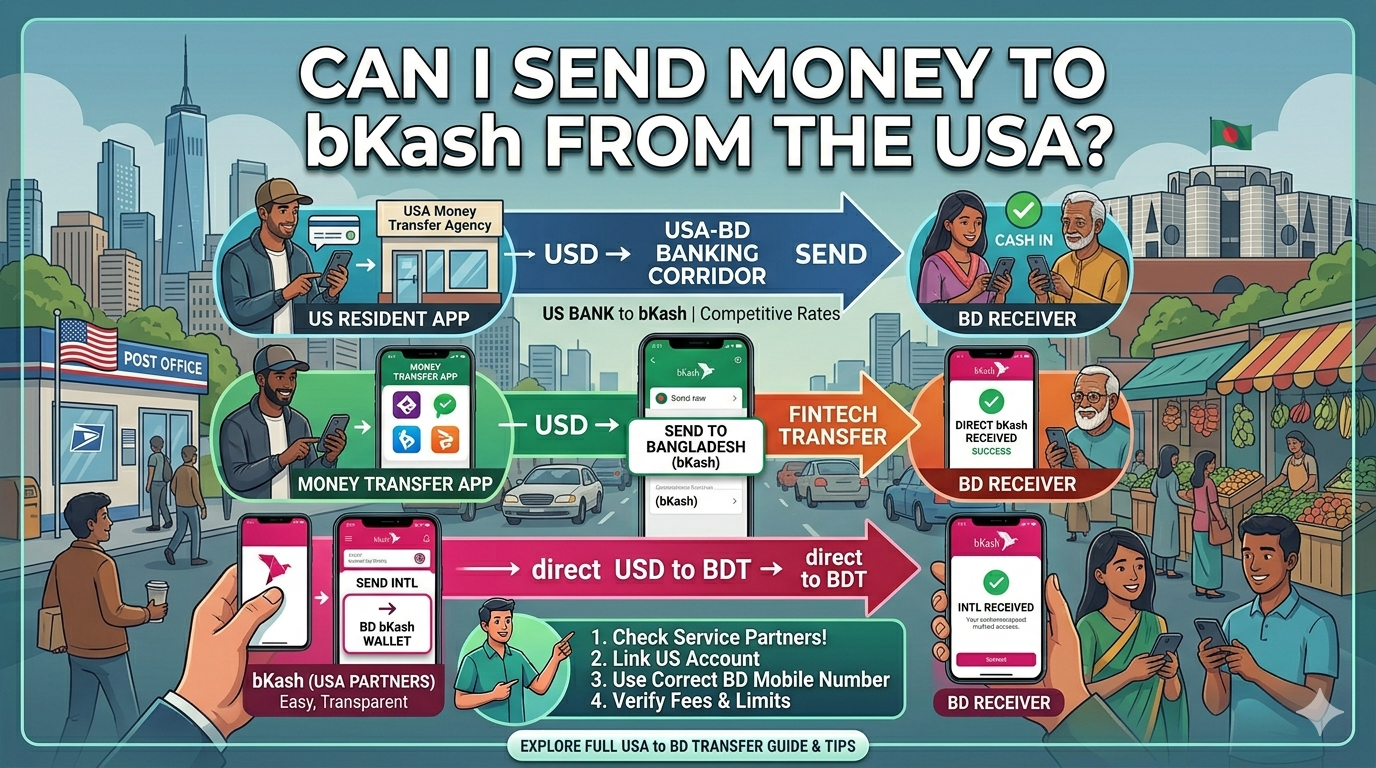
As of 2026, the answer is a resounding yes. Sending money from the United States to a bKash account in Bangladesh has never been faster or more accessible. With the integration of advanced fintech platforms and the Bangladesh government’s continued support for digital remittances, expatriates can now send funds that arrive in seconds.
This guide provides a comprehensive, step-by-step breakdown of how to send money to bKash from the USA, the best apps to use, and the legal benefits—including the 2026 government incentive.
1. Why Send to bKash? The 2026 Advantages
bKash remains the leading Mobile Financial Service (MFS) in Bangladesh. In 2026, sending money directly to a bKash wallet offers several key benefits:
- Government Incentive: The Bangladesh government continues to provide a cash incentive (historically 2.5%, but check current 2026 rates) on all legal remittances sent through authorized channels (bKash, n.d.).
- Instant Availability: Funds are usually available for the recipient to use or “Cash Out” immediately.
- ATM Cash Out: Recipients can now cash out at a reduced rate (as low as 7 Taka per thousand) from thousands of ATMs across Bangladesh (bKash, n.d.).
2. Best Apps to Send Money from USA to bKash
To send money legally and securely, you should use an authorized Money Transfer Organization (MTO). Here are the top-rated platforms in 2026:
| Platform | Speed | Best For |
| Remitly | Instant | Competitive exchange rates and ease of use. |
| Taptap Send | 3-5 Minutes | Zero transfer fees on specific corridors (Taptap Send, 2026). |
| Revolut | Seconds | Integrated banking features and 2FA security (Revolut, n.d.). |
| WorldRemit | Instant | Reliable tracking and multiple payment options. |
| Western Union | Minutes | High trust and physical agent locations if needed. |
3. Step-by-Step Guide: How to Send Money
Regardless of the app you choose, the process generally follows these five steps:
Step 1: Verification (KYC)
Download your chosen app (e.g., Remitly or Taptap Send) and complete the Know Your Customer (KYC) process. You will need:
- A valid US Government ID (Driver’s License or Passport).
- Proof of US residency.
- Your SSN or ITIN for tax compliance.
Step 2: Select “Mobile Money” as Delivery Method
When starting a new transfer, select Bangladesh as the destination. You will be asked how the recipient should receive the money. Choose “Mobile Money” or “bKash”.
Step 3: Enter Recipient Details
You must provide accurate information to avoid delays:
- Recipient’s Full Name: Must match their bKash registration/NID.
- bKash Number: Ensure it is a valid, 11-digit mobile number (e.g., 017xxxxxxxx).
Step 4: Funding the Transfer
Link your US payment source. In 2026, most apps support:
- Debit Cards: Fastest and most common.
- Bank Account (ACH): Usually lower fees but may take 1-3 business days to clear.
- Google Pay/Apple Pay: Integrated for one-tap payments.
Step 5: Confirm and Track
Review the exchange rate and the total amount the recipient will receive in BDT. Once you hit “Send,” you will receive a tracking number (MTN). Your recipient will receive an SMS from bKash once the funds are credited.
4. Limits and Regulations in 2026
Bangladesh Bank sets specific limits on MFS transactions to ensure security and prevent money laundering:
- Transaction Limit: Individual remittances to bKash can go up to 2.5 Lakh Taka (bKash, n.d.).
- Western Union Limits: Transfers through Western Union are often capped at BDT 25,000 to 50,000 per transaction depending on verification status (GEMS, 2026).
- Wallet Status: Ensure the recipient’s bKash wallet is “Active” and has not exceeded its monthly inflow limit.
5. Security Checklist
To protect your hard-earned money, always follow these safety protocols:
- Use Authorized Channels: Never send money through “Hundi” or illegal brokers. It is illegal and you will miss out on the government incentive.
- Verify the VID/Number: Double-check the 11-digit number. Once sent via MTO, it is very difficult to reverse.
- Enable 2FA: Always use Two-Factor Authentication on your transfer apps (Revolut, n.d.).
- Check for “Pending”: If a transaction shows as “In Progress” for more than 48 hours, contact the MTO support immediately (Taptap Send, 2026).
References
- bKash. (n.d.). Money Transfer Service. https://www.bkash.com/en/products-services/money-transfer-service
- GEMS. (2026, April 24). Western Union to bKash Transfer Limits: What You Need to Know. https://store.gems.gov.bd/live-western-union-to-bkash-transfer-limits
- Revolut. (n.d.). Send money to a bKash account. https://www.revolut.com/en-AU/money-transfer/send-money-with-bkash/
- Taptap Send. (2026, April 28). Taptap Send: Money Transfer – Google Play Store. https://play.google.com/store/apps/details?id=com.taptapsend
- WorldRemit. (n.d.). Online Money Transfer – How It Works. https://www.worldremit.com/en/how-it-works